
ThriveCart Enhanced Payments
ThriveCart Enhanced Payments was a major payment processor upgrade introduced in July 2023. This update introduced Stripe Enhanced and the PayPal Enhanced integration for smarter, faster, and more flexible ways to get paid such as BNPL options (AfterPay, Klarna, Affirm), helping vendors increase conversions and offer more flexible checkout experiences.
This update modernized how ThriveCart connects with payment providers and introduced Stripe Enhanced and the PayPal Enhanced Integration for faster, more reliable transactions. While this article remains available as a historical reference, it’s important to note that new Stripe Enhanced connections are no longer supported. Vendors setting up new payment integrations should instead use Stripe Connect+ Setup, which includes the same powerful enhancements such as expanded BNPL and additional payment methods support, with the most up-to-date payment infrastructure for seamless, secure processing.
If your account was created after April 2025, you will only see the option to connect PayPal Enhanced and Stripe Connect+.
New connections to Stripe Enhanced are no longer possible, but the below article details the enhanced functionality released in July 2023 and how older accounts can upgrade to PayPal Enhanced.
In the above video, we take a quick look at how you can add support for these within your ThriveCart account, how you can enable them on your product(s), and any refinements you may wish to tweak to enable/disable specific options.
How to upgrade to the Enhanced integration from PayPal Legacy:
You will need to integrate PayPal again. To connect PayPal Enhanced;
- Head to Settings > Integrations > PayPal
- Click "+Connect another PayPal account"
- Choose the type of PayPal Enhanced connection
- "Accept PayPal" includes all available PayPal options such as Venmo, Pay Later, Pay in 4, etc.
- "Accept PayPal, credit, and debit cards" will allow the customer to enter their card details in checkout - if you do not have another processor (such as Stripe) enabled on the checkout.
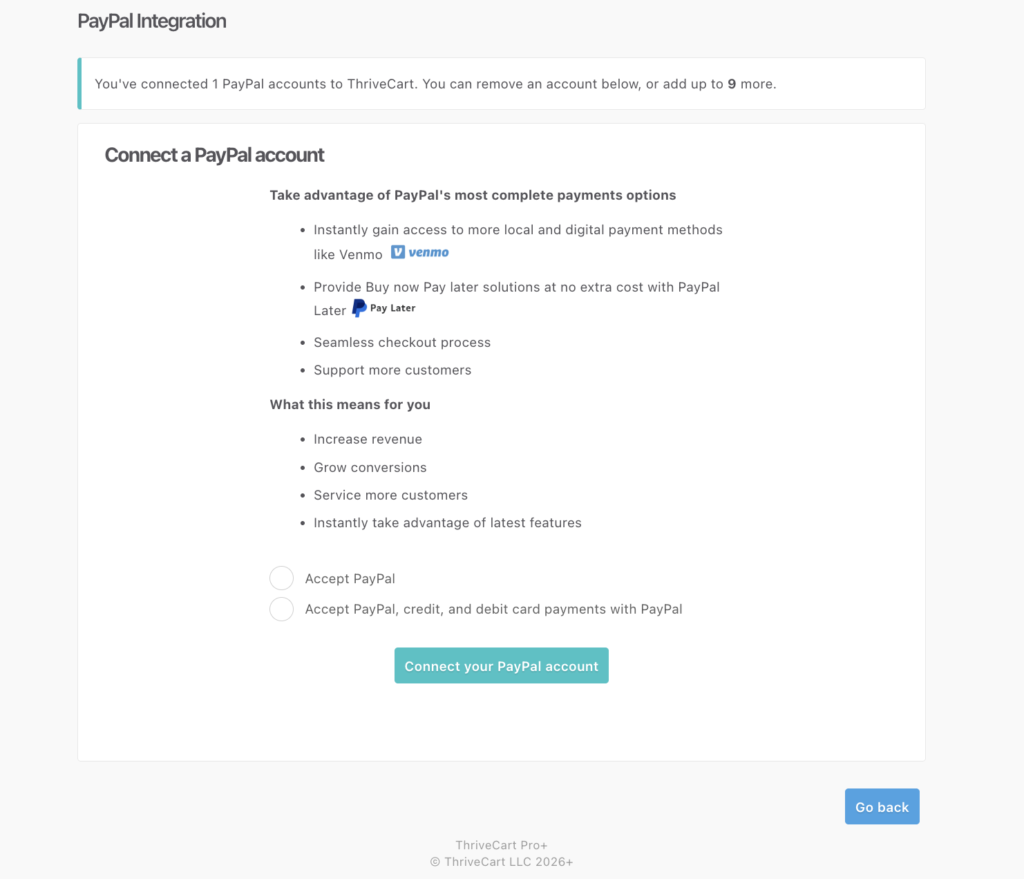
- Click "Connect your PayPal account" to be directed to PayPal, where you can login to your PayPal account, accept permissions, and then be redirected back to ThriveCart.
- The final step is to grant additional affiliate permissions. You may see the below Congratulations screen, where you can click "Grant affiliate permissions" to go through this additional permissions process:
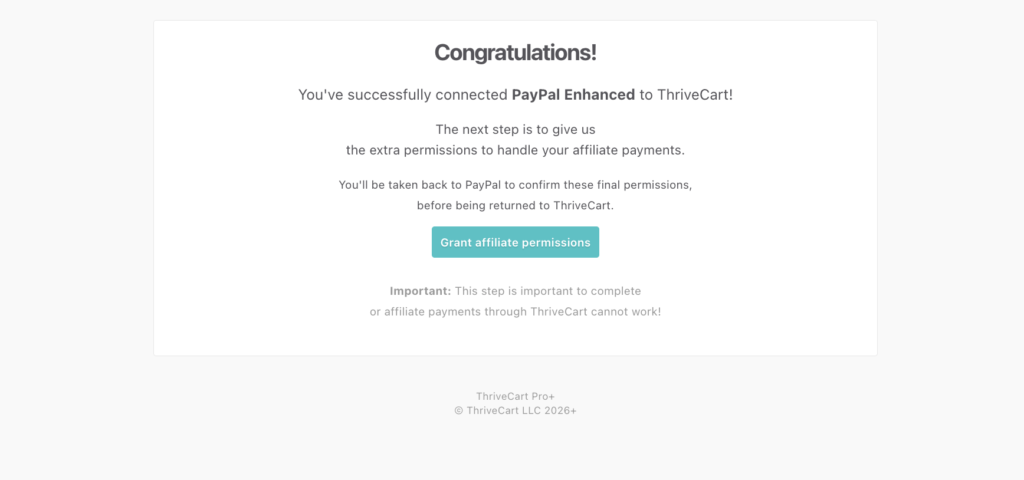
- If this step is not completed, you will be unable to pay affiliates automatically via ThriveCart. When returning to Settings > Integrations > PayPal, the dashboard will detail that this step is incomplete like so:
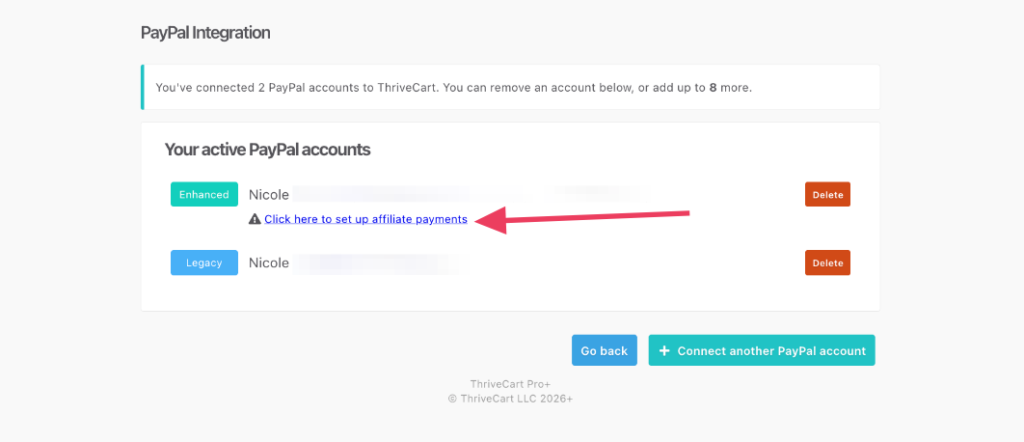
After logging in to your PayPal account again, those permissions will be automatically granted and you can click back to ThriveCart to complete setup.
Connect PayPal Enhanced to your products:
- Head to Products > Processors
- Deactivate PayPal Legacy
- Enable PayPal Enhanced
More details on the PayPal Enhanced setup process can be found here: Setting up your PayPal Integration
Once PayPal Enhanced is enabled on your product, the payment options that will be available to your customers will depend on a number of variables such as;
- The currency of your product
- The type of payment (one-time payment vs subscription) - the checkout will automatically update to show available payment methods if you offer different pricing options on your checkout page and the customer changes between options.
- Your payment processors registered region
- Your customers location
PayPal Upgrade Notes:
Do not disconnect your Legacy account, change your IPN URL, or revoke permissions from within PayPal. Doing so will break the connection (rebill tracking, refund processing, etc.) to ThriveCart on existing subscriptions initially purchased via the Legacy integration.
The PayPal enhanced integration became available for all new PayPal integrations after 12th of July 2023. You will no longer be able to integrate the legacy PayPal integration.
The enhanced PayPal integration no longer uses the IPN URL set in PayPal. However, if you still have the legacy PayPal integration in your account, you will need to ensure the IPN remains for notifications for legacy payments and events.
- PayPal replaced ThriveCart's customizable 'Complete Order' button on your checkout and upsell pages. It will show their PayPal button alongside any other related payment options such as PayPal Credit, Venmo, or Pay in 4; depending on what's available to you (as the vendor and the currency you're selling in) and for your customer (based on their location).
- If you’re using PayPal’s card payment feature (when enabling card payments as part of your initial PayPal Enhanced integration process) , this will only show on your checkout page if you do not have another card processor enabled on the product (Stripe or Auth.net) and only if the payment is a one-time payment.
- They do not support subscriptions via this method and your customers will still require a PayPal account to purchase a subscription.
- Additionally, PayPal does not offer card payment features globally, it’s limited to a number of regions: US, AU, CA, GB, DE, FR, IT, and ES. This feature won’t appear if your ThriveCart account is not set to one of the supported currencies
- When using PayPal's card payment option on your checkout page if you do not have customer address fields enabled, these will be automatically populated on your checkout page. This is a requirement from PayPal and cannot be disabled when using PayPal's card payment option.
- The enhanced PayPal integration no longer redirects your customers away from your checkout page to complete their payments, instead a window will pop up over your checkout page prompting them to complete their PayPal payment there.
Stripe Enhanced
The release of Stripe Enhanced brought with it the ability to offer a range of different payment methods available in checkout. This includes non-instant payment methods such as debit, region-specific methods, as well as Buy Now Pay Later options such as Klarna, iDeal, and AfterPay.
This functionality is now available using our Stripe Connect+ integration. To upgrade your Stripe Connection, see our article on Stripe Connect+ Setup
Legacy Template Notice
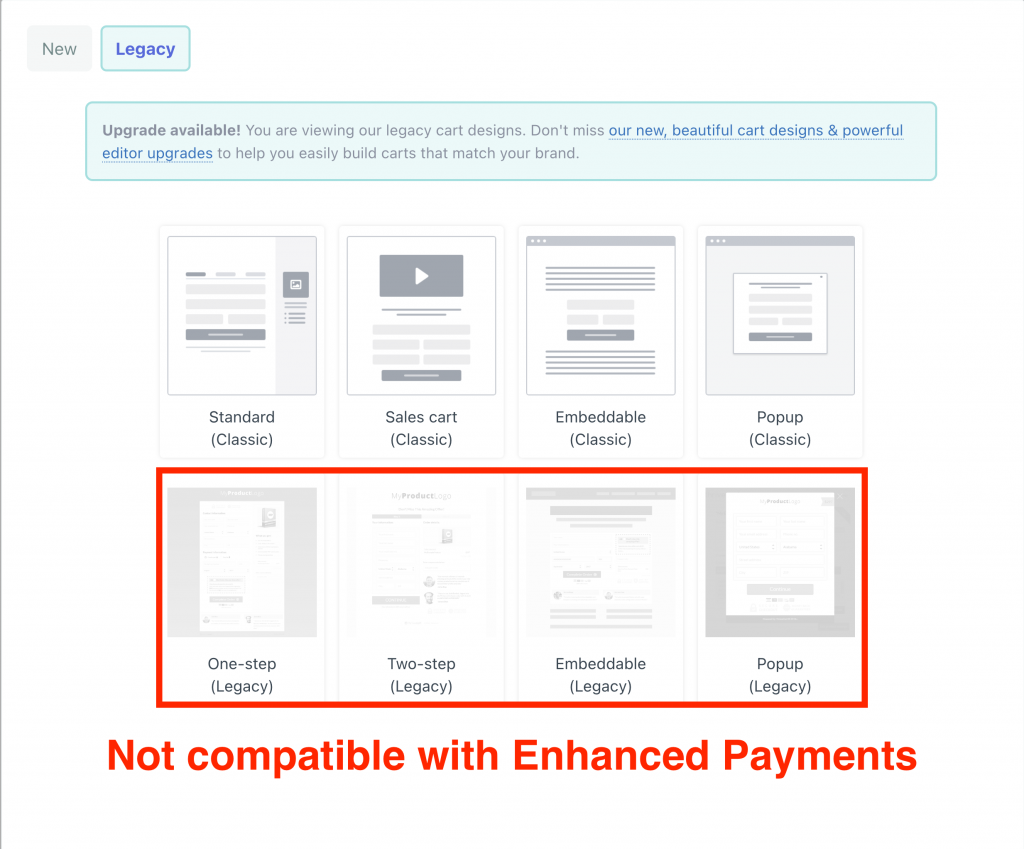
Enhanced Payments are not supported on our Legacy templates (see screenshot below). If you enable Enhanced Stripe or Enhanced PayPal on a product using a Legacy template (only available on accounts created before 2023), they will not work and you will not be able to take payment from customers.
For Stripe, this may present itself as pk_live_xxxxxxx does not have access to the account. Application access may have been revoked.

Frequently Asked Questions (FAQs)
- Q: Do I need to reintegrate my Stripe or PayPal account to use Enhanced Payments?
-
A: For Stripe, you will now need to integrate Stripe Connect+.
For PayPal, you will need to reintegrate your PayPal account to access the enhanced features.
-
- Why aren't all payment methods showing on my checkout page?
- Payment methods shown depend on several factors including:
- Your product’s currency
- Whether the payment is one-time or a subscription
- Your Stripe/PayPal account region
- Your customer’s location
- Not all methods will appear for all buyers. You can confirm eligibility with your payment processor’s support team.
- Payment methods shown depend on several factors including: